
FANOVEX Try the demo

Software for manufacturers and maintenance providers

Every fault with an owner, a deadline and a cost. Before the customer asks.

FANOVEX brings together the faults, spare parts and warranty commitments for every unit, for teams that answer to their customers for a fleet or for equipment installed across several sites.

The guided tour takes about three minutes and changes no data. The demo opens in your browser, with fictional data and no sign-up.

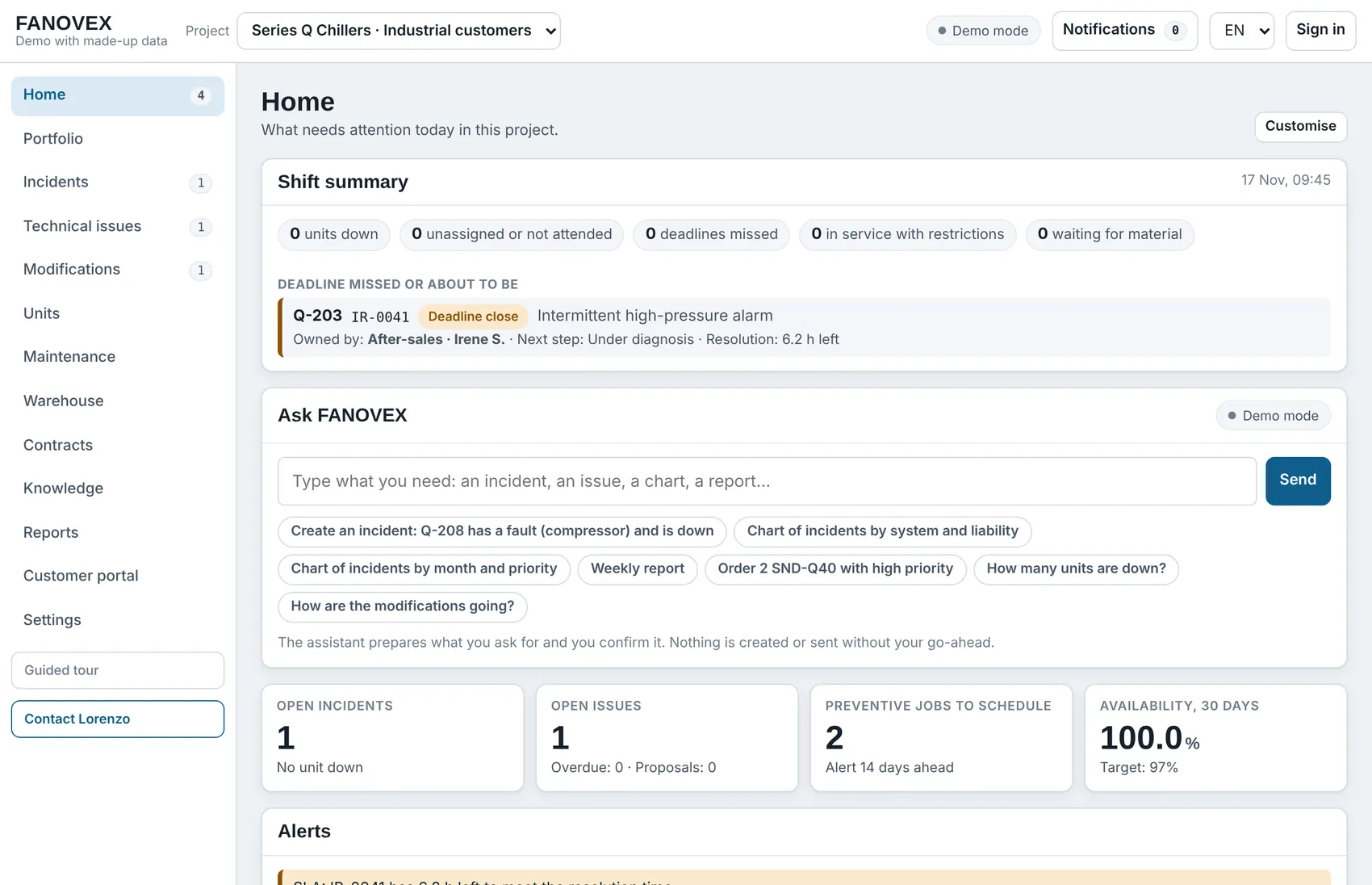
FANOVEX home screen: shift summary showing the units that are down, the unassigned cases and the deadlines
Screenshot of the demo. The figures are fictional demonstration data.

What goes wrong when a fleet is managed by email, WhatsApp and Excel

Information gets lost at shift handover

The night shift knew the part was on its way. The morning shift does not find out until eleven.

Penalties come to light too late

Nobody was keeping count of the door failures the contract allows, until the customer did.

Nobody knows whose move it is

The unit is waiting. But for what: a part, a decision or a technician?

One fault from the demo, followed closely

Tram T-111 vibrates under braking. It is incident IR-0134 in the demo and it is still open. These are three decisions FANOVEX helps you make about it.

  1. T-111 · IR-0134 The unit

    What is wrong with the unit?

    T-111 is still running, with restrictions: a warped brake disc has been found on axle 2. FANOVEX does not count it as a unit that is down. The difference matters: to the customer, a restricted unit is still in service; a unit that is down is not.

    What is wrong with the unit?
    What is wrong with the unit?
  2. T-111 · IR-0134 The previous case

    What can the technician build on?

    IR-0108 is a previous case, already closed, on another unit: the same component and the same symptom, solved by replacing the disc. It serves as a reference. The diagnosis of IR-0134 is recorded in its own record.

    What can the technician build on?
  3. T-111 · IR-0134 The customer

    What can you tell the customer?

    Two discs are on order. The record keeps two dates apart: the expected arrival of the parts and the return to normal service, which is still unconfirmed. That way nobody promises the customer a date that does not exist yet.

    What can you tell the customer?
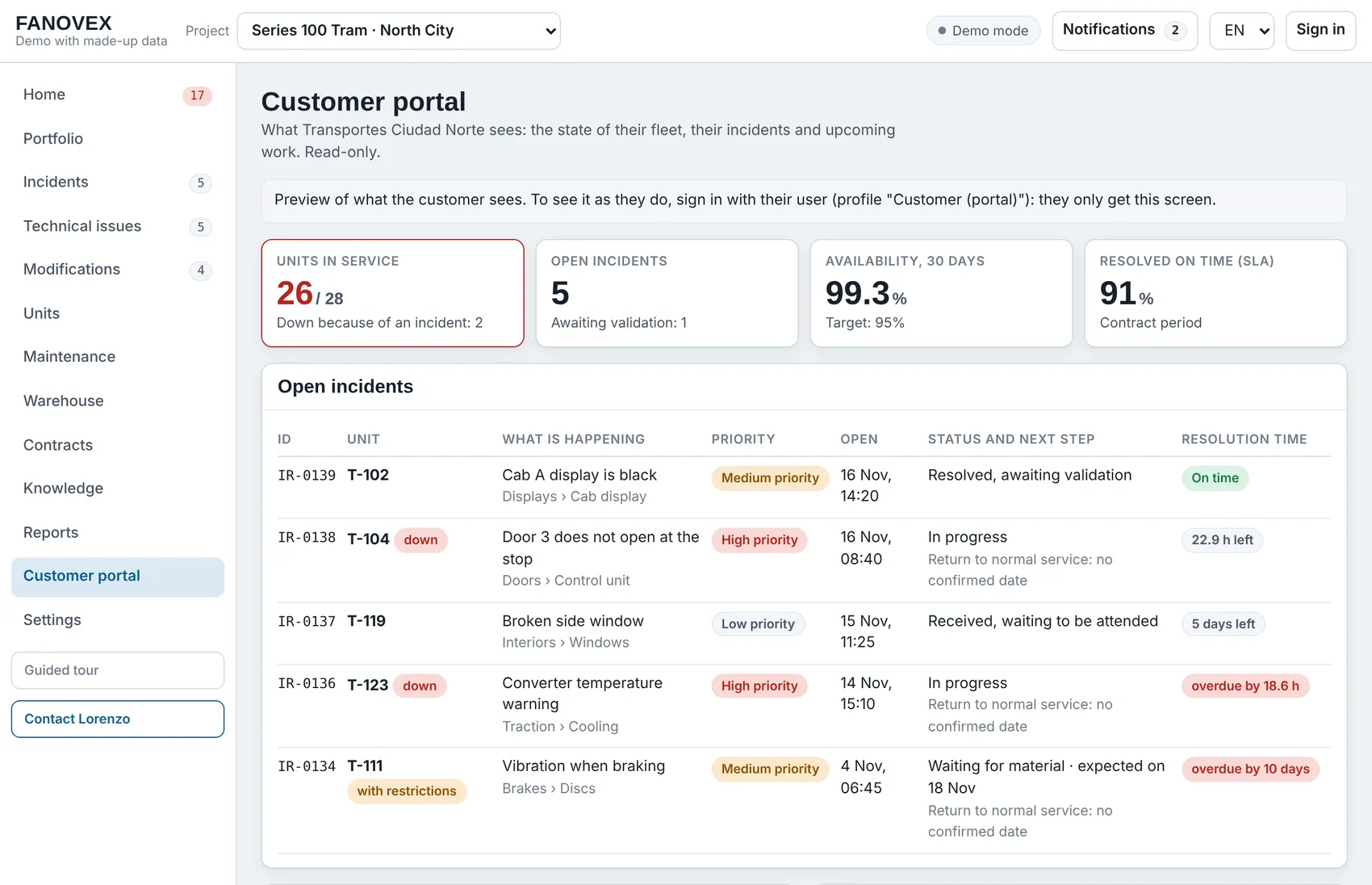
    The same incident in the customer portal, with no internal notes or part numbers.
    The same incident in the customer portal, with no internal notes or part numbers.Swipe the image to see the whole row.

This is where the record ends: IR-0134 is still open.

Open this incident in the demo

And in the contract: the door failure limit

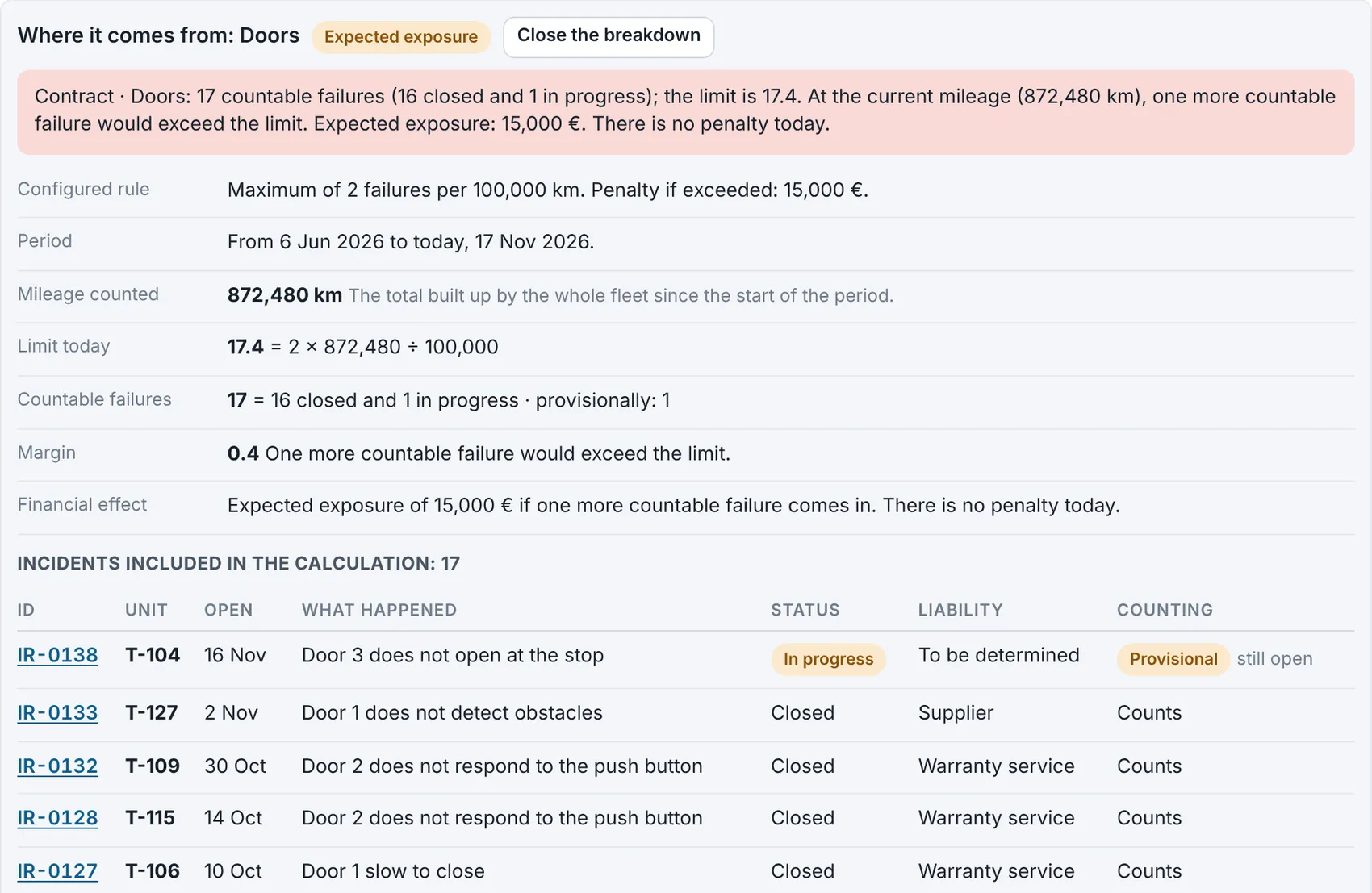
In the rail example, the contract allows 2 door failures per 100,000 km travelled by the fleet and sets a penalty of €15,000 if that is exceeded. The demo counts the failures that count towards the limit and warns before it is reached.

Countable failures
17, against a limit of 17.4One more countable failure would exceed the limit.
Expected exposure
€15,000What it would cost if the limit is exceeded. It is a forecast and is not added to the cost.
Confirmed penalty
€0It only counts once it is confirmed; then it does enter the net cost.

Fictional figures from the demo.

See the breakdown in the demo

Two examples to try in the demo

Each button opens the demo directly on that example, with fictional data. Inside, you can switch between them with the “Project” selector at the top.

Demo home screen with the industrial chillers project

Tailored to each company

The demo shows one way of working. The final software is adapted to yours.

How a pilot works

Lorenzo Fanti Hervás

Built by someone who has managed a fleet under warranty

I am Lorenzo Fanti Hervás. I have spent years keeping aircraft and trams in service. FANOVEX brings together what I have learned doing that work.

Read about my background

Try it with your own fleet in mind

Open the demo, or write to me and we can go through it together in half an hour.

FANOVEX is at an early stage: the demo is complete and I am looking for companies for the first pilot projects.

What FANOVEX does

The features are grouped by the question they answer. Each company chooses the ones it needs.

What is happening today?

The first thing the incoming shift sees: what is down, who is handling it and which deadline comes first.

  • Shift summary and handover

    The urgent items in order, with a link to each record, and a written handover for the next shift.

  • Incidents

    Each fault with its priority, who is handling it, the next step and its full history.

  • Assistant

    Type or paste a report and the software prepares the record for you to confirm.

  • Duplicate warning

    It detects whether that fault is already open or has come back after a repair.

What is happening today?
Example: the tram project.

What needs to be done?

Planned work and parts, in the same place as the faults.

  • Preventive maintenance

    Which inspection is due on each unit, and when.

  • Modifications

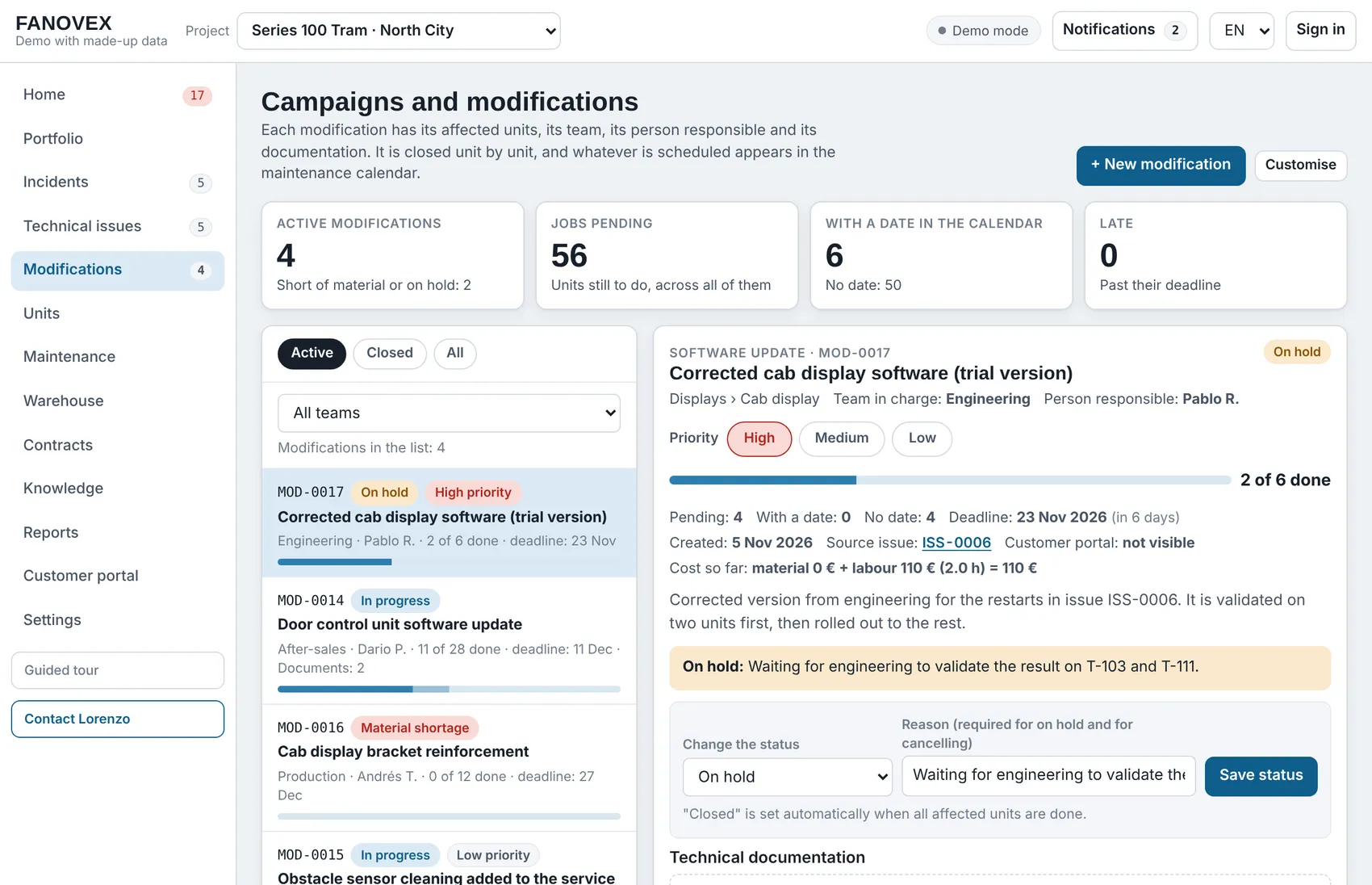
    Campaigns across the whole fleet, with progress unit by unit.

  • Warehouse and orders

    Stock with its physical location, serial numbers and orders linked to each fault.

  • Knowledge

    Procedures and previous cases, within the technician's reach.

What needs to be done?

How is the contract going?

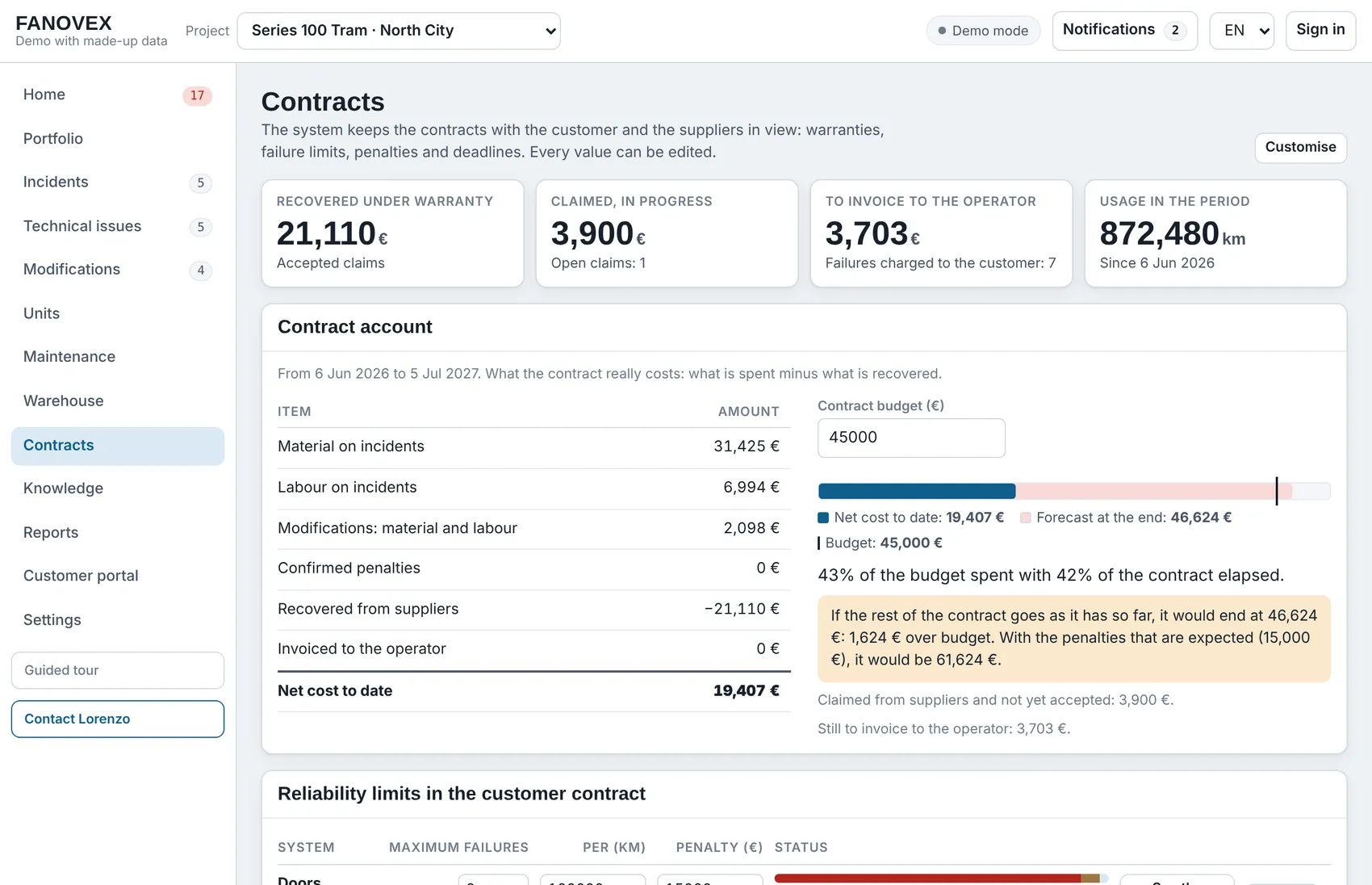
Customer commitments are calculated from the same data the workshop uses.

  • Reliability limits

    How many failures the contract allows and how many there have been, with a breakdown of each figure.

  • Supplier warranties

    When a fault is closed with a part under warranty, the claim to the supplier is prepared.

  • Contract account

    Material and labour costs, penalties and the forecast at contract end.

  • Warranty close-out

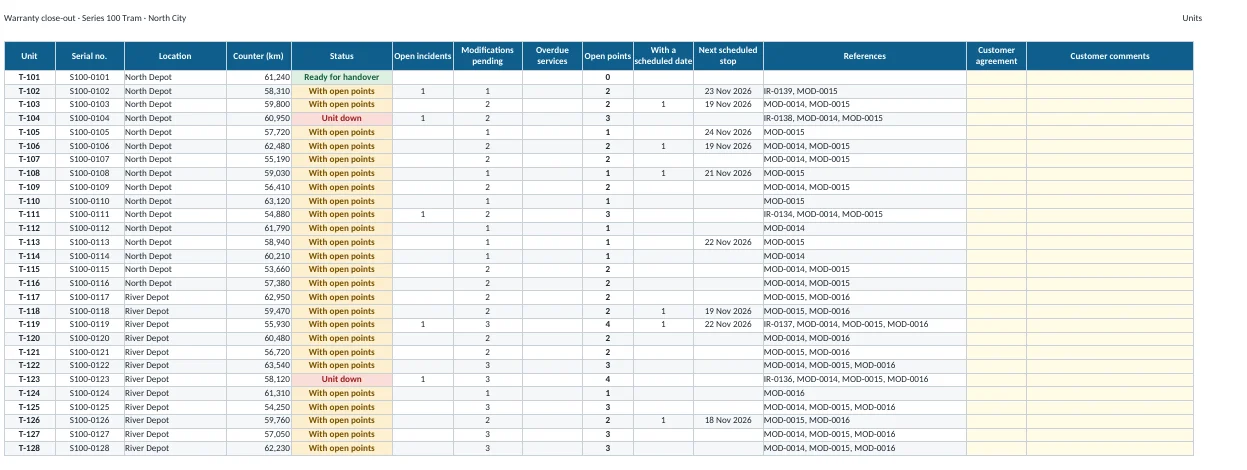
    The open points for each unit, ready to hand to the customer in Excel.

  • Reports

    The monthly report and the charts are prepared automatically, as a PDF.

How is the contract going?
Review the contract
Example: failure limit for the door system. It is an expected exposure, not a confirmed penalty.

What does the customer see?

A read-only portal, with no internal notes.

  • Status of each fault

    The current status, the next step and the expected date, without calls or emails.

  • Availability and deadlines

    The units in service and compliance with the agreed deadlines.

What does the customer see?

What FANOVEX is and what it is not

It is

  • A tool for the day-to-day work of technical service and warranty.
  • A single place for faults, parts, modifications and the contract.
  • Software that is adapted to each company.

It is not

  • An ERP or a full asset management system: it does not handle accounting, purchasing or payroll.
  • A remote diagnostics system: it does not connect to vehicles or machines.
  • A closed product that is the same for everyone.

It works alongside what you already use

FANOVEX does not force you to change the systems you already have.

  • Starting data

    Units, parts and contract rules are loaded from your own lists.

  • Output

    Reports in PDF and lists in Excel and CSV, to share or to take into another system.

  • Integration

    A connection to an ERP or another system is assessed case by case during the pilot.

An example of what it delivers

This is the warranty close-out workbook generated by the demo, with fictional data: one row per unit, its open points and a column for the customer's sign-off.

Download the example Excel file

You can also generate it in the demo, on the Contracts page.

“Units” sheet of the warranty close-out workbook

Try it with your own fleet in mind

Open the demo, or write to me and we can go through it together in half an hour.

FANOVEX is at an early stage: the demo is complete and I am looking for companies for the first pilot projects.

For those who answer to a customer for a fleet

FANOVEX is for companies that keep equipment in service under a contract they have to meet.

  • Manufacturers with a fleet under warranty

    Newly delivered trains, trams, buses or machinery, with response times and failure limits to meet.

  • Maintenance providers

    Availability contracts in which every unit out of service counts.

  • Machinery after-sales services

    Equipment spread across the sites of many customers, each with its own terms.

Two examples to try in the demo

Each button opens the demo directly on that example, with fictional data. Inside, you can switch between them with the “Project” selector at the top.

Demo home screen with the industrial chillers project

What each person gets from it

  • Shift supervisor

    Starts the shift knowing what is down and what is due first, and leaves a written handover.

  • Technician

    Sees the procedure, the previous cases and the parts on order, on a phone as well.

  • Warranty manager

    Keeps track of liability decisions, supplier claims and what is invoiced to the customer.

  • Management

    Sees the status of each contract and the penalty risk before it materialises.

  • Customer

    Checks the status of their units in their own portal.

Try it with your own fleet in mind

Open the demo, or write to me and we can go through it together in half an hour.

FANOVEX is at an early stage: the demo is complete and I am looking for companies for the first pilot projects.

User guide

Nine common tasks, step by step. Open the demo in another tab and follow them as you read.

Open the demo in another tab

  1. Start the shift
  2. Open a fault
  3. Assign and diagnose
  4. Order parts
  5. Close and assign liability
  6. Review the contract
  7. Produce the monthly report
  8. Show only what you use
  9. Find a spare part in the warehouse

1Start the shift

  1. Open Home. At the top is the “Shift summary”, with the units that are down, the unassigned cases and the deadlines.
  2. Select any row to open its record.
  3. At the end of the shift, select “Generate handover” and copy the text for the next shift.

Open Home in the demo, in a new tab

Start the shift
Example: the tram project.

2Open a fault

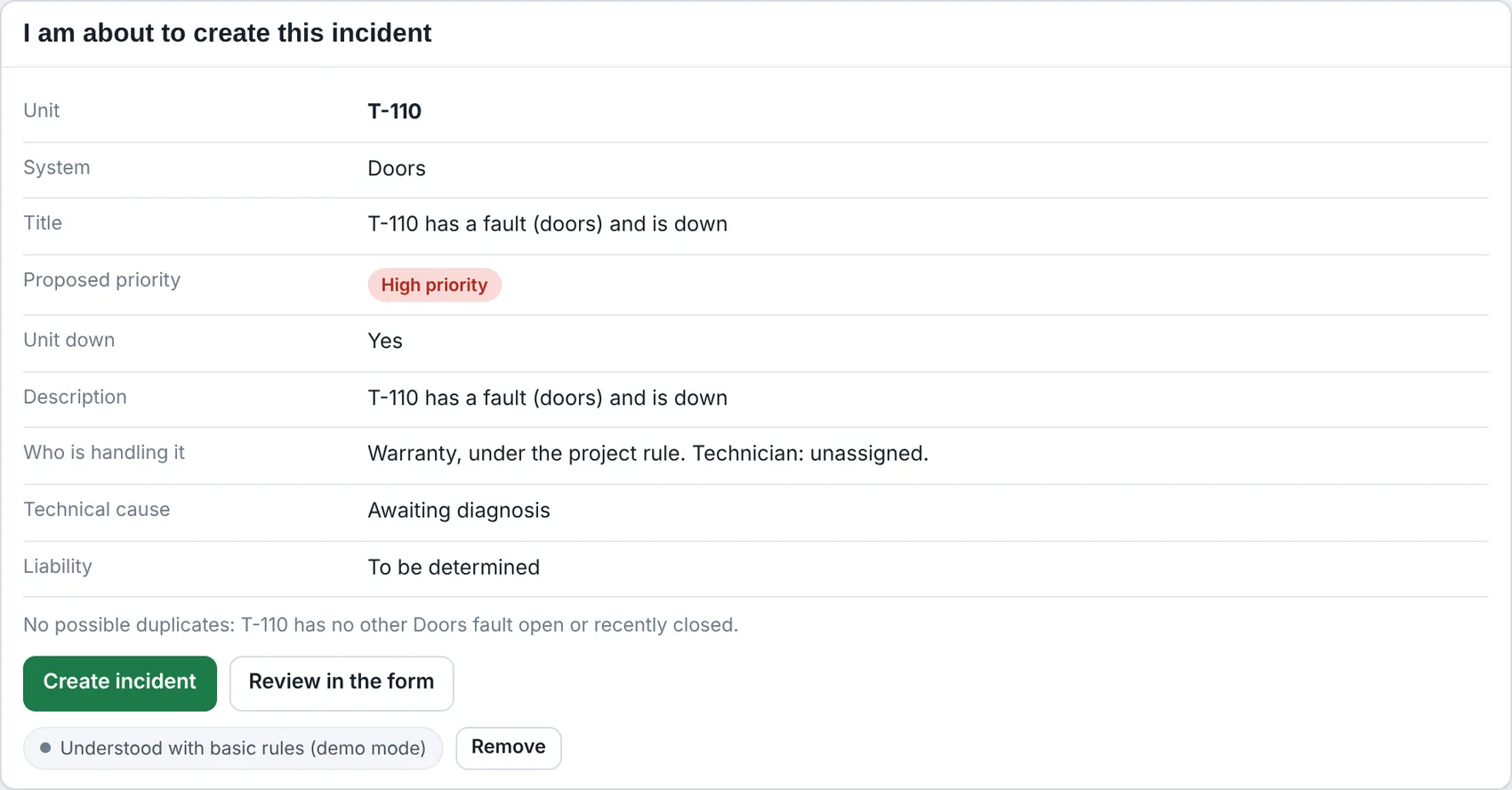
  1. On Home, type the report into “Ask FANOVEX” just as you received it.
  2. Check the proposed record: unit, system and priority.
  3. If the software warns of a possible duplicate, decide whether to add the report to the open fault or create a new one.
  4. Select “Create incident”. The first time, the demo asks you to choose a user: every change is signed with a name.

Open Home in the demo, in a new tab

Open a fault
Example: a door fault report on T-110.

3Assign and diagnose

  1. Open the record of a fault. If it has no technician yet, select “Assign” to set the team and the technician; if it already has one, as IR-0134 does, the button reads “Reassign”.
  2. Once the cause has been found, select “Record the finding”. In IR-0134 it is already recorded: you will see it under “Technical cause”, with the button “Correct the finding”.
  3. Further down the same record you will find the applicable procedure and the previous cases.

Open IR-0134 in the demo, in a new tab

Assign and diagnose
Example: T-111 · IR-0134, brake disc.

4Order parts

  1. In the record, select “Order material” and choose the part and the quantity.
  2. The next step of the fault shows the order and its expected arrival date. IR-0134 already has an order in transit: you can see it under “Next step” and “Material for this incident” without changing anything.
  3. When the parts arrive, select “Received” on the Warehouse page, choose where they are left and confirm receipt. If the order was for an incident, they stay reserved for it.

Open IR-0134 in the demo, in a new tab

Order parts
Example: T-111 · IR-0134, order for two discs.

5Close and assign liability

  1. In the record of an open fault, select “Close with cause and fix” and enter the cause, the fix and the hours.
  2. If a part has been replaced, state which one comes out and which one goes in.
  3. Propose who is liable for the failure and give the reason. A manager confirms the decision.
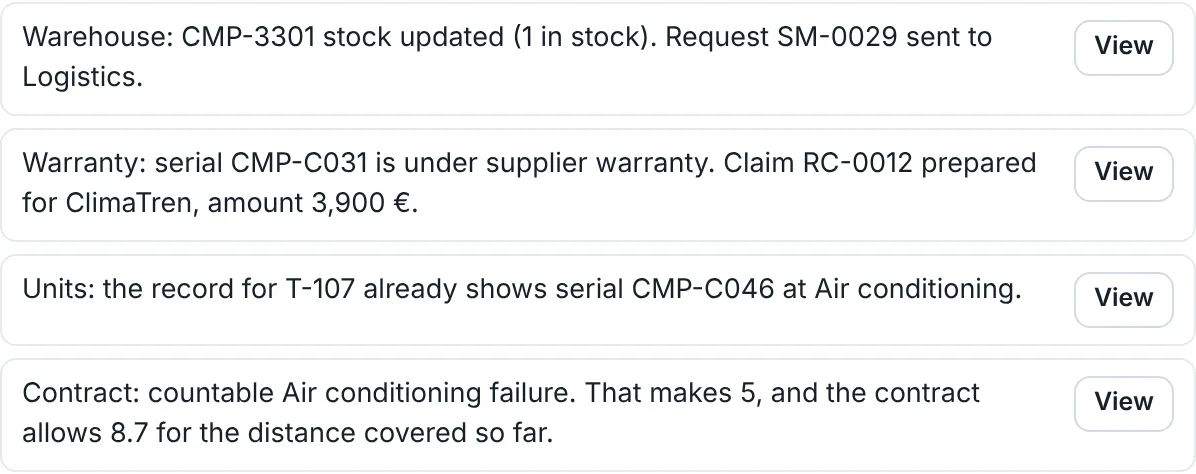
  4. On closing, the software updates stock, warranties and the contract.

Open IR-0135, already closed, in the demo, in a new tab

Close and assign liability
Example: T-107 · IR-0135, an air-conditioning fault already closed, with its cause and fix.

6Review the contract

  1. On Home, select a contract alert.
  2. The breakdown opens, with the rule, the mileage and the incidents that count.
  3. Select any incident in the list to see its record.

Open the doors breakdown in the demo, in a new tab

Review the contract
Example: failure limit for the door system. It is an expected exposure, not a confirmed penalty.

7Produce the monthly report

  1. Open Reports and choose the month in the “Monthly report” card.
  2. Select “Download PDF”, or “View report” to check it on screen first: inside you have the same “Download PDF” button.
  3. The browser downloads a PDF file with the month in its name (for example, fanovex-informe-2026-10.pdf). It includes the indicators, the charts and the detail of the month’s incidents.

Open Reports in the demo, in a new tab

Produce the monthly report
Example: monthly report for the tram project.

8Show only what you use

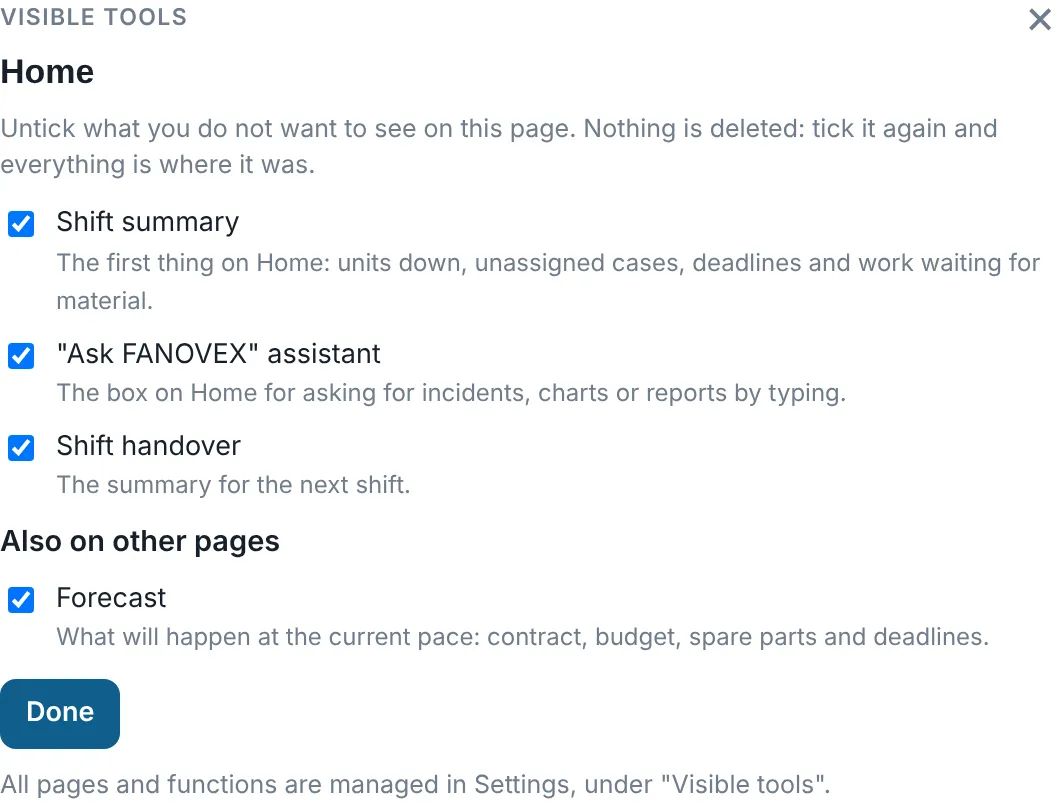
  1. On any page, select “Customise”.
  2. Untick the tools you do not want to see. Nothing is deleted: when you tick them again, everything is where you left it.
  3. In Settings you can hide whole pages.

Open Home in the demo, in a new tab

Show only what you use
Example: visible tools on the Home page.

9Find a spare part in the warehouse

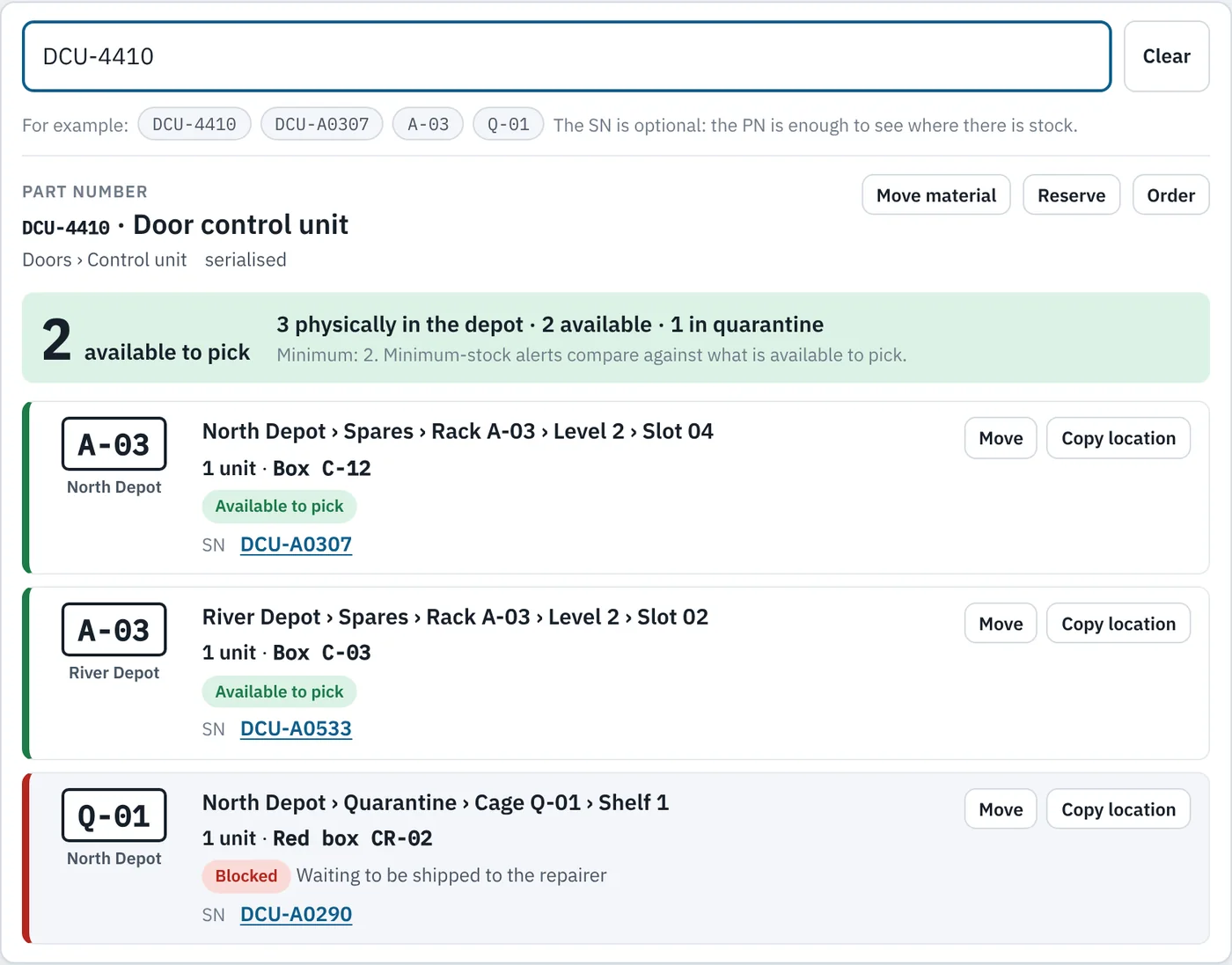
  1. Open Warehouse and type the PN, the SN, part of the name or a label code. For example, DCU-4410. The SN is optional.
  2. At the top you see how many are free to pick. Below, one row per position, with its depot, rack, level and box. Blocked parts and those outside the depot are listed apart, with the reason.
  3. To change its place, select “Move”, choose the destination and confirm the summary. Search again and it appears in the new position, and the transfer stays in its history.

Open this search in the demo, in a new tab

Find a spare part in the warehouse
Example: DCU-4410, with two units free in two depots and a faulty one in quarantine, waiting to be shipped.

Try it with your own fleet in mind

Open the demo, or write to me and we can go through it together in half an hour.

FANOVEX is at an early stage: the demo is complete and I am looking for companies for the first pilot projects.

How a pilot works

A pilot lets you check, with a single fleet or family of equipment and no commitment to continue, whether FANOVEX fits your service.

  1. We talk

    A 30-minute video call to see the demo and understand how your team works.

  2. The software is configured for your service

    Your units, systems, parts and contract rules are loaded, and the pages and tools to be used are chosen.

  3. Your team uses it on a real case

    For the agreed period, with my direct support. The adjustments included are the ones listed in writing before the start.

  4. You decide

    Together we review the agreed criterion and what would need to change. If it does not fit, you take your data with you in Excel.

What is configured, what is adapted and what is quoted

  • What is configured today

    The unit type and its counter (kilometres or hours), the systems and components, the work teams, the contract rules, the visible pages and tools, and the language.

  • What is agreed for the pilot

    Loading your starting data and the adjustments to wording, reports or rules that you need. They are listed in writing before the start.

  • New features

    They are specified, quoted separately and developed only if you approve them.

What you provide

  • A fleet or a contract to try it on.
  • A contact person.
  • The starting lists: units, parts and contract terms.

What I provide

  • The software configured for your case.
  • Training for the team.
  • The adjustments agreed for the pilot.

How to tell whether it was worth it

Before we start we agree on a simple criterion. For example: choose one family of equipment and measure, before and during the pilot, how long the person in charge takes to answer three questions: what is down, what is missing and who owns the next action.

I do not publish savings figures, because there are no measured results yet.

Clear terms before we start

The scope, the duration, the price and the handling of data are agreed in writing before any real data is loaded.

It opens a draft in your mail app. You can edit or delete any line before sending it.

lorenzo@fanovex.com

Frequently asked questions

  • Is it only for trains and trams?

    No. The demo also includes an example with industrial chillers. It works for any equipment with units, faults, spare parts and a service contract.

  • Does it replace my ERP or my maintenance system?

    No. FANOVEX handles the day-to-day work of technical service and warranty, and works alongside the systems you already have.

  • Does it work on a phone?

    Yes. It runs in the browser on a computer, tablet or phone, with nothing to install.

  • Which languages is it available in?

    English, Italian and Spanish. Other languages can be added.

  • Can it be adapted to my company?

    Yes. Today you can configure the unit type, the systems, the contract rules, the visible pages and the language. Adjustments for a pilot are agreed in writing, and a new feature is quoted separately.

  • Does it use artificial intelligence?

    In the public demo the assistant interprets notices with local rules and does not send the text to any AI service. For a pilot, we can agree that an AI reads notices, contracts or manuals; in that case, what is sent and to which service is set out in writing. Either way, nothing is created without a person confirming it.

  • Where is my data stored?

    The demo's data is stored only in your browser. In a pilot, hosting and access are agreed in writing before any real data is loaded.

  • What happens to my data if I stop using it?

    It is yours. You take it with you in Excel and it is deleted from the system.

  • How much does it cost?

    It depends on the features and on the number of fleets or contracts. The price of the pilot is agreed in writing before it starts.

  • Who is behind FANOVEX?

    Lorenzo Fanti Hervás. You can read about my background on the “About me” page.

  • What can I try today, and what is agreed for a pilot?

    Today you can try everything in the demo, with two example projects and fictional data: opening and closing faults, ordering parts, checking the contract, producing reports and viewing the customer portal. Loading your data, AI reading, integrations with other systems and new functions are agreed or developed for each pilot.

Try it with your own fleet in mind

Open the demo, or write to me and we can go through it together in half an hour.

FANOVEX is at an early stage: the demo is complete and I am looking for companies for the first pilot projects.

Legal notice and privacy

Last updated: 17 November 2026.

  • Website owner

    This website and the demo belong to Lorenzo Fanti Hervás, resident in Milan (Italy). Contact: lorenzo@fanovex.com.

  • Purpose

    This website is for information only: it presents FANOVEX and its author's background. Nothing is sold or contracted online. Any agreement is made separately and in writing.

  • Demo

    The demo uses fictional data only. In the public demo, anything you enter is stored only in your browser: the assistant works with local rules and the content is not sent to any server. Even so, do not enter real data.

  • Cookies

    This website uses no cookies and no analytics or tracking tools. It only stores the language you choose in your browser, so that it is shown next time.

  • Hosting

    The website and the demo are hosted by Cloudflare which, like any server, records technical connection data (such as the IP address) in order to deliver the pages and protect them against attacks.

  • Emails you send me

    If you write to me, I use your name, your email address and what you tell me only to reply to you and, if you are interested, to talk about FANOVEX. I do not share them with anyone or use them to send you advertising. I keep them for as long as the conversation lasts and for no more than two years after our last contact.

  • Your rights

    You can ask me at any time to show you, correct or delete your data by writing to lorenzo@fanovex.com. If you are not satisfied with my reply, you can lodge a complaint with the data protection authority in your country.

  • Ownership of the content

    The text, screenshots and design of this website belong to Lorenzo Fanti Hervás. Air Nostrum and Stadler are mentioned only to describe the author's professional background; this website is not connected with those companies.

I built the software I needed

I am Lorenzo Fanti Hervás. I am Spanish and Italian, and I live in Milan. I trained as an avionics maintenance technician and have worked hands-on with machines ever since: first aircraft, then trains and trams.

Lorenzo Fanti Hervás
Training
Higher Technician in Avionics Maintenance. Cheste (Valencia, Spain), 2019.
Languages
Native Spanish and Italian; professional English.
  1. November 2018 – January 2022

    Air Nostrum (Valencia)

    Aircraft maintenance technician on CRJ and ATR regional aircraft: scheduled, corrective and heavy maintenance, in an environment where every task is documented and traceable.

  2. From January 2022

    Stadler Rail Valencia

    Production, testing and commissioning of rail vehicles, and coordination of activities from that stage onwards. I got to know the vehicles from the inside before taking charge of their service.

  3. 2023 – August 2026

    Stadler Rail, Milan

    Move to Milan and responsibility for the warranty service on the tram project: coordinating the technicians, setting priorities and dealing with the customer.

  4. 2026

    FANOVEX

    I have put what I learned into software that any manufacturer or maintenance provider can use.

How FANOVEX came about

In a warranty service, the answers needed every morning are always the same: which units are down, what each one is waiting for and how much margin is left before a contract limit is exceeded.

FANOVEX comes from that experience: it shows them on a single screen for the shift supervisor, the service manager and the customer.

Neither this website nor the demo contains data, figures or documents from the companies I have worked for. Everything shown in the demo is fictional. Air Nostrum and Stadler are part of my career: they are not FANOVEX customers.

Talk to Lorenzo

Write to me

I reply personally in English, Italian or Spanish.

Tell me what equipment you look after and what is hardest to coordinate. One example is enough for a first conversation.

lorenzo@fanovex.com

Full screenshot